Showing posts with label SharePoint 2007. Show all posts

Thursday, March 28, 2013

How to find SharePoint farm ID in Configuration database


To find Farm ID the following SharePoint Management shell (or PowerShell) command could be used:

$spFarm=[Microsoft.SharePoint.Administration.SPfarm]::Local
$spFarm.Id

Farm ID could be also found in Configuration database by running the following SQL query:


SELECT * From Objects where ClassId = ’674DA553-EA77-44A3-B9F8-3F70D786DE6A’

The '674DA553-EA77-44A3-B9F8-3F70D786DE6A' GUID is always a ClassID for Farm object.

More information here

Monday, October 15, 2012

Restarting IIS after installing/removing/upgrading SharePoint solution

Do I need to restart IIS after installing/removing/upgrading solution?

The answer is simple - YES.

Found few articles explaining it:

SharePoint Solution Deploy, retract, upgrade – What causes your SharePoint farm to go offline IISRESET (web server outage)


Deploying a solution

Initially, the package manifest.xml is checked for its content & destination locations. The files specified in the manifest.xml are copied to the locations. After solution files are copied to the target servers, a configuration reset is scheduled for all front-end Web servers; the reset then deploys the files and restarts Microsoft Internet Information Services (IIS). Farm administrators can specify when this occurs (a timer job).
Reference: http://msdn.microsoft.com/en-us/library/aa544500.aspx


Retracting a solution

On each front-end Web server, the following occurs:
- Internet Information Services (IIS) is disabled.
- Files are removed from the system.
- IIS is re-enabled and Microsoft SharePoint Foundation is reloaded when a user browses to a page.

- Farm administrators can specify the time when the retraction takes place.


Upgrading a solution

There are two ways to do an upgrade of a solution. i.e. Replacement and Update. Both inolve a an IISRESET.
Replacements are essentially a retract and optionally removal of a WSP. Then the new version is added and deployed. Causing an IISRESET (twice!).
Updates are essentially a deployment with the same file name but different GUID. SharePoint detects this and retracts the old solution and deploys the new one..causing an IISRESET.
Please note that there is a -local option when deploying a solution, but according to MSDN, this is to be used for troubleshooting purposes.
Reference: http://msdn.microsoft.com/en-us/library/microsoft.sharepoint.administration.spsolution.deploylocal.aspx


Why do we need to restart IIS after copied DLLs into Assembly
We restart the IIS to reset Application pool as lot of things in SharePoint are cached. The alternative option is you can recycle the application pool of the application for which you have deployed the WSP or DLLs

Deploying solutions with no downtime

Found interesting article about deploying solutions with no downtime


The most important attribute we need to remember is the –Local attribute this will only ensure that the solution deployment will only occur on the local server.
Other attributes include:-
  • WebApplication – this will deploy the solution to a specific Sharepoint Web Application
  • GacDeployment – this option allows a solution which contains .NET assemblies to be installed in to the GAC to be installed.
  • CasPolicies – this option allows a solution which contains code access security policies for the assemblies / web parts to be deployed.

Saturday, October 6, 2012

Finding what site definition is used by a SharePoint site

If you're performing SharePoint migration, you might face an issue with custom site definitions (or templates) site are based on. Or you might want to know what out of the bow definition was used for a site.

To find the template there are different options:
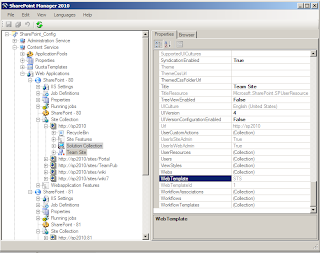
  1. Using SharePoint Manager tool [available for 2007, 2010 and 2013.] Download it for free from Codeplex and install it. Then open the SharePoint Manager and connect to the SharePoint site collection. When you click on a specific SharePoint site, on the right side it will show you all the properties available in the SP object model for that site. Find WebTemplate and Configuration values for the site:
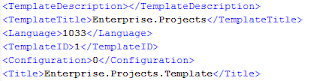
  2. If there is no way to install SharePoint Manager or if any other problems, then save the current site as site template [.STP or .WSP extension]. And save it to disk somewhere. Navigate to that location and rename the file to .CAB extension. Extract the CAB file.If it is SharePoint 2007 you will find manifest.xml file that contains TemplateID and Configuration of the site:
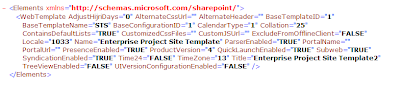
    If it's SharePoint 2010 open the folder that ends with "
    WebTemplate" and open Elements.xml. Find BaseTemplateName and BaseConfigurationID in the file:


     Navigate to end of this post for the TemplateID to Name mapping.
  3. Through managed code we can identify this very easily with the below code:

    view plaincopy to clipboardprint?
    using (SPWeb web = site.OpenWeb("/"))
    {    
       string templateID = web.WebTemplateId.ToString();
    }
  4. Using STSADM.EXE. It needs high level permissions. Means the user should be an administrator on the server. Below is the command we need to use for knowing the site template.
    stsadm.exe -o enumallwebs -databasename [content database name]
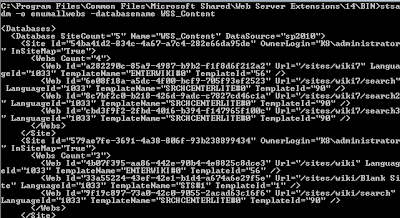
  5. Using SQL Management Studio you can execute the below query on the content database of the site collection.
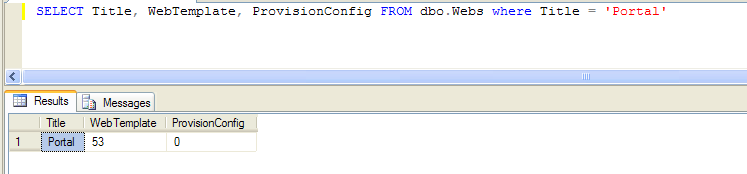
    SELECT Title, WebTemplate, ProvisionConfig FROM dbo.Webs WHERE Title='Test Publishing Site'
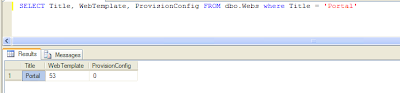
Choose one option which is useful or easy for you and identify the correct template.


Site template ID to Name mapping:
0 - GLOBAL (SetupPath=global) - "Global template"
1 - STS - "windows SharePoint Services Site", STS#0 - "Team Site", STS#1 - "Blank Site", STS#2 - "Document Workspace"
2 - MPS - MPS#0 - "Basic Meeting Workspace", MPS#1 - "Blank Meeting Workspace", MPS#2 - "Decision Meeting Workspace", MPS#3 - "Social Meeting Workspace",  MPS#4 "Multipage Meeting Workspace"
3 - CENTRALADMIN - "Central Admin Site"
4 - WIKI - "Wiki Site"
7 - BDR - "Document Center"
9 - BLOG - "Blog"
20 - SPS (OBSOLETE) - "SharePoint Portal Server Site"
21 - SPSPERS - "SharePoint Portal Server Personal Space"
22 - SPSMSITE - "Personalization Site"
30 - SPSTOC (OBSOLETE) - "Contents area Template"
31 - SPSTOPIC (OBSOLETE) - "Topic area template"
32 - SPSNEWS (OBSOLETE) - "News area template"
33 - SPSNHOME (SubWebOnly) - "News Home template"
34 - SPSSITES - "Site Directory area template"
36 - SPSCOMMU (OBSOLETE) - "Community area template"
38 - SPSREPORTCENTER - "Report Center Site"
39 - CMSPUBLISHING (SubWebOnly) - "Publishing and Team Collaboration Site"
40 - OSRV  - "Shared Services Administration Site"
47 - SPSPORTAL - "Corporate Intranet Site"
50 - SRCHCEN - "Search Center"
51 - PROFILES - "Profiles"
52 - BLANKINTERNETCONTAINER - "Internet Presence Web Site"
53 - BLANKINTERNET (SubWebOnly)BLANKINTERNET#0 - "Publishing Site", BLANKINTERNET #1 - "Press Releases Site", BLANKINTERNET#2 - "Publishing Site with Workflow"
54 - SPSMSITEHOST - "My Site Host"
56 - ENTWIKI - "Enterprise Wiki"
90 - SRCHCENTERLITE (SetupPath=SiteTemplates\SRCHCENTERLITE) - "Search Center Lite"
6221 - PWA (SetupPath=SiteTemplates\PWA) - "Project Web Access Site"
6215 - PWS (SetupPath=SiteTemplates\PWS) - "Project Workspace"
14483 - OFFILE - "Records Repository", "Records Repository"


Tuesday, October 2, 2012

SharePoint site templates vs site definitions.

Site Template
  • A site template (*.stp file) is created through the user interface or through implementation of the object model. It is a package containing a set of differences and changes from a base site definition.
  • The site template package is stored as a CAB-based file that can be downloaded or uploaded to site collections by users with the appropriate rights. As before, site templates offer a measure of portability to SharePoint Applications.
  • It is not as fast as a pure site definition as site definitions are cached on start of IIS on the web front ends while site templates are stored and hence need to be fetched from the content database and merged with the site definition code at runtime to render the site.
  • Also note that if you plan to transfer a site template to separate farm, that the farms have the same versions installed of SharePoint installed.  (hotfixes,etc.) This is due to the dependence site templates have on the original base site definition they were created from.
Site Definition
  • The core definition of what a site is in SharePoint.
  • It is installed on file system of web front ends, located at ..\12\Template\SiteTemplates. This directory is language-neutral.
  • It consists of .aspx pages and .xml files with Collaborative Application Mark-up Language (CAML).
  • A major benefit is that the Page and List definition is read locally from the file system, not from Content Database.
  • A site definition Page and List definition are cached at the IIS process start up
  • Customizations made to site definition are stored in content database, not on the file system. This can be performed via SharePoint Designer, or when custom site templates are saved.
  • Site Definitions are developer created
  • Localization: WSS 3.0 supports full site template localization (based on ASP.Net 2.0 via XML files and .ASPX files pulling strings from RESX files. Therefore solutions can be shipped “language packs” of resource files.
  • “Global Template” defines commonality across site definitions; it gets called before any other template. It works by injecting common provisioning content into all new sites. ONET.XML file defines base types, galleries, mobile redirects
  • Data is stored directly on the Web servers, so performance is typically better.
  • A higher level of list customization is possible through direct editing of a Schema.xml file.
  • Certain kinds of customization to sites or lists require use of site definitions, such as introducing new file types, defining view styles, or modifying the Edit menu.
  • Customization of site definition requires more effort than creating custom templates.
  • Editing a site definition after it has been deployed is difficult.
  • Doing anything other than adding code can break existing sites.
  • Users cannot apply a SharePoint theme through a site definition.
  • Users cannot create two lists of the same type with different default content.
  • Customizing site definitions requires access to the file system of the front-end Web server.
  • Custom templates are easy to create.
  • Almost anything that can be done in the user interface can be preserved in the template.
  • Custom templates can be modified without affecting existing sites that have been created from the templates.
  • Custom templates are easy to deploy.
  • Custom templates are not created in a development environment.
  • Custom templates are less efficient in large-scale environments.
  • If the site definition on which the custom template is based does not exist on the front-end server or servers, the custom template does not work.

Custom site definitions hold the following advantages over custom templates:

  • Data is stored directly on the Web servers, so performance is typically better.
  • A higher level of list customization is possible through direct editing of a Schema.xml file.
  • Certain kinds of customization to sites or lists require use of site definitions, such as introducing new file types, defining view styles, or modifying the Edit menu.


Site definition disadvantages include the following:

  • Customization of site definition requires more effort than creating custom templates.
  • Editing a site definition after it has been deployed is difficult.
  • Doing anything other than adding code can break existing sites.
  • Users cannot apply a SharePoint theme through a site definition.
  • Users cannot create two lists of the same type with different default content.
  • Customizing site definitions requires access to the file system of the front-end Web server.


Custom templates hold the following advantages over customization of site definitions:

  • Custom templates are easy to create.
  • Almost anything that can be done in the user interface can be preserved in the template.
  • Custom templates can be modified without affecting existing sites that have been created from the templates.
  • Custom templates are easy to deploy.


Custom template disadvantages include the following:

  • Custom templates are not created in a development environment.
  • Custom templates are less efficient in large-scale environments.
  • If the site definition on which the custom template is based does not exist on the front-end server or servers, the custom template does not work.


Friday, April 6, 2012

Multi-day reoccurring events in SharePoint

I did not know that you're not able to create a multi-day reoccurring event in SharePoint.
There are a lot of discussions  about that.

Basically, as soon as you check "Make this a repeating event", the date field for Start/End Time disappears:

That's valid for both SharePoint 2007 and 2010.

Hmm... how would create an event to show that I have Friday-Sunday off every week for example? Well, it may be not a real case, but the real one is migrating Outlook Calendars to SharePoint.

Thursday, December 8, 2011

Installing SharePoint solution under the hood

Great table explaining states during installing/uninstalling solutions:

Central AdminSite/Web Level FeaturesGACWeb.Config14-RootFeaturesSharePoint Config DB, Objects Table – SolutionsSharePoint Config DB, Objects Table – FeaturesWeb App Content DB, Features Table
Add-SPSolutionSolution Added but Not DeployedN/AN/AN/AN/ASolution Definition AddedN/AN/A
Install-SPSolutionDeployed to Web AppInstalled FeatureDLLs AddedSafe Control Entries AddedFeatures AddedSolution Definition Still ExistsFeature Definition AddedN/A
Enable-SPFeatureSolution Still DeployedActivated feature to Site/WebStill ExistsStill ExistsStill ExistsSolution Definition Still ExistsFeature Definition Still ExistsFeature Activation Link Added
Disable-SPFeatureSolution Still DeployedDeactivated feature from Site/WebStill ExistsStill ExistsStill ExistsSolution Definition Still ExistsFeature Definition Still ExistsFeature Activation Link Deleted
UnInstall-SPFeatureSolution Still DeployedUninstalled featureStill ExistsStill ExistsStill ExistsSolution Definition Still ExistsFeature Definition DeletedN/A
UnInstall-SPSolutionRetracted from Web AppUninstalled featureDLLs DeletedSafe Control Entries DeletedFeatures DeletedSolution Definition Still ExistsFeature Definition DeletedN/A
Remove-SPSolutionSolution DeletedN/AN/AN/AN/ASolution Definition DeletedN/AN/A


The above table has been taken from here: Install/Uninstall table

Installing (MSDN)

Uninstalling (MSDN)

Thursday, November 17, 2011

Delete SharePoint orphan site

If you can see the site in database, but not in Central Administration


stsadm -o deletesite -force -siteid e2a114b8-80c9-41f6-87bf-3feddf2ad9b6 -databaseserver DS1 -databasename DB1


http://technet.microsoft.com/en-us/library/cc288016(office.12).aspx

Friday, May 6, 2011

SharePoint works slow for the first time after restart

Ever thought things on ASP.NET were a bit slow the first time accessing them? Many of you are aware that ASP.NET from a web admin perspective know that things have to recompile and things just aren't as fast the first time. In fact some times things are incredibly slow the first time and are incredibly slow. Ever had users say, for some odd reason some times when I hit my SharePoint site it takes 30 seconds to load, then after a refresh it goes sub second, even clearing their cache the page is fast. That's because it's not a user issue, its simply compiling, caching, etc... on the server after an IISReset or app pool reset or worker process cycle.

Read the whole Joel Oleson post

Monday, August 23, 2010

Document Property Parsing in SharePoint

When you upload, move, or copy a file to a document library, Windows SharePoint Services determines if a parser is associated with the document's file type. The parser extracts all the properties and matching property values from the document, and adds them to the property bag object. Windows SharePoint Services accesses the document property bag and determines which properties match the columns for the document. It then promotes those properties, or writes the document property value to the matching document library column.
Windows SharePoint Services can also invoke the parser to demote properties, or write a column value into the matching property in the document itself.
Usefull Links:

Friday, July 9, 2010

Limitations of STSADM -o export/import related to publishing sites

The original article is here

STSADM -o export/import is often used to split site collections into multiple pieces when they reached a certain limit. Or to do the vice versa and consolidate multiple site collections into one larger one. Both of these actions work fine as long as the migrated content does not use the publishing feature.
For site collections that make use of the publishing feature it is not supported to migrate root sites into sub sites or sub sites into root sites.
The reason for this limitation is that the publishing feature stores vital information like page layouts but also various properties like information about variation, reusable content and so on in the root site of a site collection.
When migrating a root site into a subsite the imported content will link to the new location of the previous root site. E.g. the page layout URLs will afterwards point to the page layouts library in the sub site and not of the root site which does not work as the publishing feature requires these items to be in the root site. So additional actions like moving the page layouts to the root site and adjusting all page layout urls would be required. Similar things would be required for variations and reusable content.
On the other hand when migrating a sub site to a root site it gets even worse: in this situation important content which was stored in the root site of the site collection is no longer available as the sub site does not contain the necessary information as they haven't been exported in the first place. So after importing the subsite as new root site items based on the publishing feature will be non functional.
Be aware that this limitation will also affect sites with custom features which store information outside the current site.
Valid migration scenarios when using the publishing feature are the following:
  • export the site collection starting at the root site and import as root site into a new site collection
    (using a custom application you can specify which sub sites to export if you would like to avoid to export all of them)
  • export sub sites of the site collection and import them as sub sites into an existing site collection that has the publishing feature enabled

Thursday, April 22, 2010

SharePoint maximum upload size on W2k8

On a Windows Server 2008 computer that has IIS 7.0-only installations, you add the maxAllowedContentLength value. When you are running Windows SharePoint Services on a Windows Server 2008-based computer that has IIS 7.0, you find that you cannot upload files that are larger than 28 MB even though you have configured the large file upload settings. Usually, the error that users see is "The page cannot be displayed." In some circumstances, users may also see an "HTTP 404" error.

To work around this problem refer the following artcile

Tuesday, April 20, 2010

SharePoint administrators comparision

What the Farm admin can do and what cannot?

The following articles describe differences between SP admins:

http://technet.microsoft.com/en-us/library/cc288186.aspx


SharePoint groupDoes role exist by default?Can do thisCannot do this
Farm Administrators
Yes
Perform administrative tasks in Central Administration
Take ownership of any content site.
Administer individual sites or site content unless they take ownership of the site.
GroupDoes role exist by default?Can do thisCannot do this
Administrators
Yes. Windows group that exists by default; not a SharePoint group.
Install products.
Create new Web applications and new Internet Information Services (IIS) Web sites.
Start services.
Deploy Web Parts and new features to the global assembly cache.
Perform all farm-level tasks in Central Administration (provided that the Central Administration site is located on the local computer).
Run the Stsadm command-line tool.
Note Note:
Being a server-level administrator is a pre-requisite of running the Stsadm command-line tool. Depending on which command you actually run, you might need additional permissions. For example, if you run stsadm.exe –o deleteweb, the command requires that the account have write access to the content database that contains the Web application.
Administer individual sites or site content.
Administer databases.
SharePoint groupDoes role exist by default?Can do thisCannot do this
Site collection administrator
Yes
  • Perform all administration tasks for sites within the site collection.
Access the Central Administration site.

SharePoint groupDoes role exist by default?Can do thisCannot do this
Site nameOwners
Yes
Perform administration for the site only, not the entire site collection.
Perform administrative tasks for documents, lists, and libraries.
Access the Central Administration site.
Perform site collection administration tasks, such as restoring items from the second-stage Recycle Bin and managing the site hierarchy.


Thursday, March 11, 2010

Delete corruption from SharePoint database

The kinds of corruption include the following:
  • Sites that have no Webs
  • Webs that have no sites
  • Webs without a document root folder
  • Webs without parent Webs
  • Lists without a parent Web
  • Lists that contain documents or items without a parent list
http://support.microsoft.com/kb/954773/